
TikTok emojis make comments, captions, and conversations more expressive. While most users rely on familiar emojis such as 😂, ❤️, 🔥, and 🥺, TikTok also has a collection of hidden emojis that can be accessed through special text codes. These custom emojis have distinctive designs and are popular with people who want to make their comments more playful, emotional, or memorable.
If you have ever seen a small cartoon face in a TikTok comment and wondered how someone added it, you may have encountered one of these hidden emojis. Instead of selecting the image from a standard keyboard, users enter a shortcode such as [smile], [happy], or [loveface] inside square brackets. When supported by TikTok, the code is converted into a custom emoji.
This guide explains what TikTok emojis are, how secret emoji codes work, what popular codes mean, and how to use them naturally. You will also learn the difference between hidden TikTok emojis and regular emojis, how to troubleshoot codes that do not work, and how creators can use emojis to make their content more engaging.
Whether you use TikTok on an iPhone, an Android phone, or a computer, this article will help you understand the basics and choose the right emoji for different situations.
What Are TikTok Emojis?
TikTok emojis are small visual symbols used to communicate emotions, reactions, humor, and ideas on the platform. The term generally refers to two different categories: standard emojis available through your device’s keyboard and custom emojis that can be activated using TikTok-specific codes.
Standard emojis include familiar symbols such as 😍, 😭, 💀, and ✨. They are part of the Unicode emoji standard, which allows compatible devices and applications to display the same basic characters, although their visual designs may differ.
Hidden TikTok emojis work differently. These custom illustrations are associated with special text codes written inside square brackets. For example, typing [smile] or [loveface] in a supported TikTok text field may display a custom graphic instead of the original code.
The main difference is that ordinary emojis are selected from a keyboard, while hidden TikTok emojis require you to know the correct shortcode.
These custom emojis are useful because they offer a distinctive appearance that can make a comment feel more playful or expressive. They are especially interesting to users who enjoy discovering lesser-known TikTok features.
However, support can vary by app version and text field. A code that works in a comment may not work in a profile field, a message, or another application. It is best to test a code before relying on it.
TikTok Emoji Codes: Quick Reference Guide
TikTok emoji codes are text shortcuts that users can type or copy into supported areas of the app. The following table includes widely recognized codes and their usual meanings.
| TikTok emoji code | Meaning | When to use it |
| [smile] | Happiness and friendliness | A wholesome video |
| [happy] | Excitement and joy | Good news or celebrations |
| [angry] | Anger or frustration | A frustrating situation |
| [cry] | Sadness or emotional distress | A touching or sad video |
| [embarrassed] | Shyness or awkwardness | An uncomfortable moment |
| [surprised] | Surprise or disbelief | An unexpected reveal |
| [wronged] | Hurt feelings or pleading | A dramatic or funny reaction |
| [shout] | Strong emotion or excitement | A high-energy moment |
| [flushed] | Blushing or embarrassment | A compliment or crush |
| [yummy] | Enjoyment or appetite | Food and cooking videos |
| [complacent] | Calm satisfaction | A confident reaction |
| [drool] | Desire or admiration | Delicious food or an impressive look |
| [scream] | Shock, fear, or excitement | Horror or surprising content |
| [weep] | Deep sadness | An emotional scene |
| [speechless] | Being unable to respond | An unbelievable moment |
| [funnyface] | Silly or playful behavior | Comedy videos |
| [laughwithtears] | Intense laughter | Funny clips and jokes |
| [wicked] | Mischief or a cheeky attitude | Playful humor |
| [facewithrollingeyes] | Sarcasm or annoyance | An eye-roll-worthy situation |
| [sulk] | Pouting or disappointment | A playful complaint |
| [thinking] | Thought or uncertainty | A question or mystery |
| [lovely] | Affection or appreciation | Sweet moments |
| [greedy] | Wanting more | Something tempting |
| [wow] | Amazement | An impressive achievement |
| [joyful] | Strong happiness | Celebrations |
| [hehe] | A mischievous laugh | A cheeky comment |
| [slap] | Dramatic or playful reaction | A surprising punchline |
| [loveface] | Admiration and affection | A favorite creator or outfit |
| [proud] | Pride and accomplishment | A milestone or achievement |
| [nap] | Sleepiness or boredom | Tired or slow moments |
Important: These are commonly documented TikTok emoji codes, not a guarantee that every code will render in every version of the app. The table focuses on familiar codes and practical meanings rather than claiming that every possible shortcode is supported everywhere.
What Do the Most Popular TikTok Emojis Mean?
An emoji can communicate more than its literal appearance. Its meaning often depends on the video, the surrounding comment, and the relationship between the people interacting. Understanding these differences helps you use TikTok emojis more naturally.
Smile TikTok Emoji
The [smile] code is used to express friendliness, warmth, and simple happiness. It is a useful choice when you want to respond positively without making your comment overly dramatic.
For example, if someone shares a video about helping an animal or surprising a friend, a smiling reaction can show that you enjoyed the moment.
Example comment: “This made my day [smile]“
Happy TikTok Emoji
The [happy] code communicates stronger excitement than a simple smile. It is suitable for celebrations, exciting announcements, funny moments, and videos that leave you feeling cheerful.
Example comment: “You finally did it! [happy]“
This code can make a congratulatory message feel more energetic and personal.
Loveface TikTok Emoji
The [loveface] code expresses admiration, affection, or enthusiasm. It can work well when reacting to a stylish outfit, a cute pet, an impressive performance, or a creator you appreciate.
Example comment: “That outfit is everything [loveface]“
The intended feeling is usually positive, but context matters. A comment on a romantic video may communicate affection, while the same code under a fashion video may simply express admiration.
Proud TikTok Emoji
The [proud] code is useful when celebrating progress, effort, or an achievement. It can show support for someone who has completed a difficult task, reached a goal, or shared a personal success.
Example comment: “Look at how far you’ve come [proud]“
It can also be used jokingly when someone celebrates a small accomplishment.
Cry TikTok Emoji
The [cry] code is associated with sadness and emotional reactions. However, TikTok users frequently use crying expressions for humorous situations, exaggerated disappointment, or moments that are emotionally overwhelming.
Example comment: “That ending was too much [cry]“
A crying emoji does not always mean that someone is genuinely upset. It may communicate laughter, sympathy, or dramatic disbelief, depending on the conversation.
Wronged TikTok Emoji
The [wronged] code is known for its pleading or hurt expression. It is often used when someone wants to appear innocent, disappointed, or playfully upset.
Example comment: “Why would you do that to me [wronged]“
This can be particularly effective in humorous conversations because it adds a dramatic, almost theatrical reaction.
Wow TikTok Emoji
The [wow] code is suitable for moments that are impressive, unexpected, or difficult to believe. It can be used under transformation videos, creative performances, surprising reveals, and extraordinary achievements.
Example comment: “I was not expecting that ending [wow]“
Thinking TikTok Emoji
The [thinking] code communicates curiosity, uncertainty, or careful consideration. It can be useful when a creator asks a question or presents a puzzle that makes viewers stop and think.
Example comment: “Wait, how does that actually work [thinking]“
It may also be used sarcastically, so the surrounding conversation determines whether it feels serious or humorous.
Yummy TikTok Emoji
The [yummy] code is associated with food, taste, and enjoyment. It is an obvious choice for cooking tutorials, restaurant videos, dessert reviews, and satisfying food clips.
Example comment: “I need to try this recipe [yummy]“
The same expression can also be used figuratively to show admiration for something appealing, but food-related content is its most straightforward use.
Funnyface TikTok Emoji
The [funnyface] code is useful for lighthearted and silly reactions. It works with comedy sketches, unexpected jokes, playful challenges, and videos that encourage viewers not to take things too seriously.
Example comment: “The expression at the end [funnyface]“
Choosing an emoji that matches the tone of a video makes your comment feel more relevant than adding a random symbol.
How to Use TikTok Emojis Step by Step
Using hidden TikTok emojis is relatively simple once you know the code format. You do not need a special keyboard or a separate emoji application to try a supported shortcode.
Step 1: Open the TikTok App
Open TikTok on your phone and sign in if necessary. Find a video on which you want to leave a comment.
The mobile application is a practical starting point because hidden emoji behavior may differ between mobile and web versions.
Step 2: Open the Comment Section
Tap the comment icon to view the discussion below the video. Locate the text field used to write a new comment.
Step 3: Choose an Emoji Code
Select the expression that matches your reaction. For example, choose [happy] for excitement, [cry] for an emotional response, or [thinking] for curiosity.
Make sure you copy the full shortcode, including both square brackets.
Step 4: Enter the Code Correctly
Type or paste the code into the comment field exactly as written.
For example:
[smile]
[loveface]
[proud]
Avoid adding spaces inside the brackets. A variation such as [ smile ] may not be recognized because it is not the exact code.
Step 5: Post Your Comment
Submit the comment and check how TikTok displays it. When a supported code is recognized, the app may convert it into its custom emoji graphic.
In some cases, you may continue to see the code as ordinary text. This does not necessarily mean that your device is faulty. The shortcode might be incorrect, unsupported in that location, or affected by an app update.
Step 6: Combine the Emoji With a Message
You can use an emoji alone or include it in a sentence.
For example:
“That was the best plot twist [wow]“
“I am so happy for you [proud]“
“This recipe looks amazing [yummy]“
A short message gives your reaction more context and helps other viewers understand what you mean.
Hidden TikTok Emojis vs. Regular Emojis
Although both types of emojis communicate emotions, they have different technical characteristics and uses.
| Feature | Hidden TikTok emojis | Regular emojis |
| How to enter them | Type a supported bracket code | Select a character from the emoji keyboard |
| Appearance | TikTok-specific artwork | Design depends on the device or app |
| Keyboard availability | Not normally listed as standard keyboard characters | Available on most modern phones |
| Portability | Custom graphics may not transfer outside TikTok | Unicode characters work across many compatible apps |
| Main advantage | Distinctive TikTok-style expressions | Broad compatibility and variety |
| Example | [loveface] | 😍 |
| Best use | Custom reactions in supported TikTok fields | Captions, messages, bios, and cross-platform content |
Regular emojis are generally the safer choice when you need your message to work across several applications. Hidden TikTok emojis are useful when you specifically want the custom visual style associated with the platform.
Neither option is universally better. Choose based on the message you want to communicate and where you intend to publish it.
Popular Regular Emojis Used on TikTok
You do not need to use hidden codes to participate in TikTok trends. Regular emojis remain an important part of the platform’s visual language.
Here are some popular choices and the meanings they often communicate.
| Emoji | Common meaning on TikTok | Example use |
| 😂 | Laughter or amusement | A funny video |
| 💀 | Something is extremely funny | An unexpected joke |
| 😭 | Strong emotion, sadness, or laughter | A dramatic moment |
| ❤️ | Love and appreciation | A heartfelt message |
| 🔥 | Impressive, excellent, or exciting | A performance or outfit |
| ✨ | Emphasis, aesthetic appeal, or irony | A transformation |
| 🥺 | Pleading, shyness, or affection | A cute request |
| 🤡 | Foolish behavior or self-deprecating humor | A relatable mistake |
| 👀 | Interest, curiosity, or anticipation | A surprising announcement |
| 🫶 | Affection and support | Thanking followers |
| 🥹 | Being touched or emotional | A wholesome story |
| 🤔 | Curiosity or doubt | A question |
| 🙃 | Irony or awkward humor | An uncomfortable situation |
| 😍 | Admiration or affection | A beautiful scene |
| 🎉 | Celebration | A milestone or announcement |
| 💯 | Agreement, confidence, or approval | A strong point |
| 🫡 | Respect or acknowledgment | Showing support |
| 🤝 | Agreement or cooperation | A shared opinion |
Meanings can change as trends develop. For instance, the skull emoji may mean that something is hilarious rather than frightening, while sparkles may add genuine emphasis or signal irony.
Before interpreting an emoji literally, consider the tone of the video and the surrounding comments.
TikTok Emojis for Different Situations
Choosing an appropriate emoji is easier when you think about the type of content you are watching. The following examples show how different expressions can fit common TikTok scenarios.
For Funny Videos
Comedy clips often attract exaggerated reactions. Regular emojis such as 💀, 😂, and 🤣 are widely understood, while [laughwithtears] may provide a custom TikTok-style response when supported.
Example: “I was not ready for that ending 💀”
For Sad or Emotional Videos
Use ❤️, 🥹, 😭, or a suitable hidden code such as [cry] when reacting to a touching story or emotional moment.
Example: “This story genuinely touched my heart 🥹”
If someone is discussing a real loss or difficult experience, a sincere supportive comment is usually better than a joke.
For Fashion and Beauty Videos
Emojis such as 🔥, ✨, 😍, and 🫶 can express appreciation for styling, makeup, transformations, and creative presentation.
Example: “The final look is stunning ✨”
A custom code such as [loveface] can also express admiration in a supported text field.
For Food and Cooking Videos
Food creators often receive comments containing 🤤, 😋, ❤️, and 🔥. The hidden [yummy] code can offer an alternative when it renders correctly.
Example: “That looks delicious 😋”
For Educational Videos
Emojis such as 🤔, 💡, 👏, and 💯 can help communicate curiosity, understanding, and appreciation.
Example: “I finally understand how this works 💡”
For educational content, a useful comment or question adds more value than a string of unrelated emojis.
For Friendship and Relationship Videos
Hearts, smiling faces, and affectionate expressions work well for content about friendship, relationships, family, and meaningful memories.
Example: “Everyone deserves a friendship like this 🫶”
The right choice depends on whether the video is romantic, humorous, emotional, or simply wholesome.
Read more: Almawadahit.com Review: What Is It, What Does It Offer, and Is It Worth Visiting in 2026?
How TikTok Creators Can Use Emojis Effectively
Emojis can help creators express personality and make short messages easier to scan. However, using more emojis does not automatically improve engagement. The strongest approach is to choose symbols that support the meaning of the content.
Make Captions Easier to Read
A relevant emoji can draw attention to an important point in a caption.
For example:
“Three simple editing tips to improve your videos 🎬”
The emoji reinforces the topic instead of distracting from the message.
Encourage Meaningful Conversations
Creators can ask viewers to respond with an emoji that represents their reaction.
For example, a creator might ask viewers to leave ❤ ️ if they enjoyed a story or 🤔 if they want a more detailed explanation.
These prompts work best when they are relevant to the video and invite genuine participation.
Match the Tone of Your Content
A comedy account can use playful expressions, while a professional educational account may benefit from a more restrained approach.
Consistency helps viewers recognize the creator’s style. It also prevents emojis from making serious messages seem insensitive or confusing.
Avoid Overusing Emojis
A caption containing too many symbols may be harder to read. Repeated emojis can also make a message look generic or overly promotional.
Use emojis to emphasize a point, convey a clear emotion, or add personality. Keep the actual message understandable without them.
Do Not Treat Emojis as a Ranking Shortcut
Adding hidden TikTok emojis to comments or captions does not guarantee more views, followers, or higher search rankings. Content performance depends on many factors, including relevance, viewer interest, presentation, and how people respond to the video.
Creators should prioritize original content, clear communication, accessibility, and a positive viewing experience rather than relying on emojis alone.
Why Are TikTok Emoji Codes Not Working?
Sometimes you enter a hidden TikTok emoji code and the app displays the bracketed text instead of a custom graphic. This can happen for several reasons, and it does not always indicate a problem with your phone.
Check the Spelling
Hidden emoji codes must match a recognized shortcode. Check every letter and make sure you include both square brackets.
For example, [loveface] is a recognized code, while [love face] is a different string and may not work.
Remove Unnecessary Spaces
Do not insert spaces between the brackets and the shortcode. Use [happy] rather than [ happy ].
Extra punctuation or altered characters can also prevent a code from being recognized.
Try a Different Text Field
Emoji support may vary depending on where you enter a code. Try a supported code in a video comment first, then check the specific field where you originally wanted to use it.
Do not assume that support in comments guarantees support in bios, usernames, direct messages, or every caption field.
Update the TikTok App
An outdated application can sometimes behave differently from a newer version. Check your device’s app store for an available TikTok update.
Updating may resolve certain compatibility issues, although it cannot make an unsupported code work in every location.
Restart the App
Close TikTok and reopen it if the application appears to be behaving unexpectedly. You can also check your internet connection and restart your device if other features are malfunctioning.
Test a Common Code
Try a familiar shortcode such as [smile] or [happy] to see whether the behavior is specific to one code or affects all hidden emojis.
If the code still appears as plain text, the feature may not be supported in that particular field or app version. You can use a regular emoji from your keyboard instead.
Can You Use TikTok Emojis on iPhone and Android?
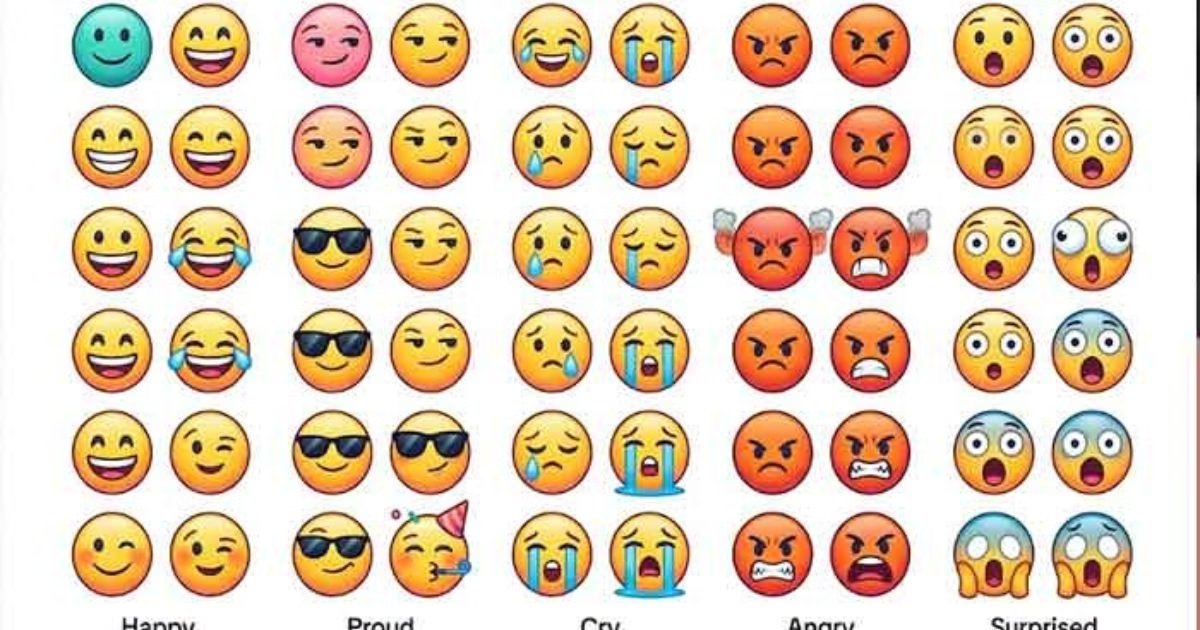
Yes. Both iPhone and Android users can use regular emojis on TikTok through their device’s emoji keyboard. Hidden TikTok emoji codes can also work on supported versions of the mobile app.
The precise appearance and availability of a custom emoji depend on TikTok’s implementation rather than simply the phone’s operating system.
Using TikTok Emojis on iPhone
Open TikTok and navigate to a supported text field. Use your keyboard to type a shortcode, including its square brackets, or paste one that you have copied.
Submit the text and check whether TikTok converts it into a custom graphic.
If the code does not convert, verify the spelling and try another supported location. Switching between keyboard languages is generally unnecessary for basic English shortcodes.
Using TikTok Emojis on Android
The process is similar on Android devices. Open the TikTok application, select a suitable comment field, and type or paste the code.
Check the posted result rather than assuming that the shortcode will always transform while you are typing.
If the code remains visible, test a common shortcode and make sure that your application is updated.
Using TikTok Emojis on a Computer
TikTok’s desktop experience may not handle hidden emoji codes in exactly the same way as its mobile application.
You can still use ordinary emojis wherever the text field supports them. If you specifically want a hidden TikTok emoji, test the shortcode in the relevant desktop field before publishing your content.
Can You Copy and Paste TikTok Emojis?
Yes, you can copy and paste hidden emoji codes as text. This is one of the easiest ways to use them without memorizing every shortcode.
For example, copy one of these codes:
- [smile]
- [happy]
- [thinking]
- [wow]
- [loveface]
- [proud]
- [yummy]
- [cry]
Paste the complete code into a supported TikTok field and check the result after posting.
Remember that copying the shortcode is not the same as copying the custom graphic itself. If you paste the code into another social media application, it will generally remain ordinary text because the other application does not necessarily recognize TikTok’s custom emoji system.
If you need an actual image for a graphic design, you need a suitable image asset rather than the text shortcode alone. Make sure that any asset you use is appropriate for your intended purpose and permitted by the relevant usage terms.
How to Use TikTok Emojis in Captions, Comments, and Bios
Different parts of TikTok serve different purposes, so emoji support should be considered separately for each location.
TikTok Comments
Comments are the most familiar place to experiment with hidden emoji codes. They allow you to respond directly to a creator or another viewer.
For example:
“That transition was perfect [wow]“
“Your dog is adorable 😍”
The first example uses a hidden code that may convert in a supported comment. The second uses a regular emoji that is broadly compatible with modern devices.
TikTok Captions
Captions provide context for videos and can contain ordinary emojis such as 🎬, ✨, and ❤️.
Hidden shortcode behavior in captions can vary, so test the code before relying on the custom graphic. If it remains plain text, use a regular emoji or rewrite the caption.
TikTok Bios
A profile bio is useful for explaining who you are, what you create, and what visitors can expect from your account.
Regular emojis can help organize a bio:
“🎬 Video creator | ✨ Lifestyle | 📍 India”
This is an example of a bio using standard emojis, not hidden codes.
Do not assume that a shortcode such as [happy] will turn into a custom emoji in a profile bio.
TikTok Direct Messages
Regular emojis are a straightforward way to express emotion in messages. Hidden shortcode support in direct messages may differ from support in comments.
If you want to use a particular hidden emoji, test it in the message field before sending something important.
TikTok Emojis for Users in India and the USA
TikTok users in India and the USA may use emojis to express similar emotions, but slang, humor, language, and cultural context can influence how a message is understood.
A good emoji guide should explain both the symbol and the situation in which it makes sense.
TikTok Emojis in India
Users creating content for Indian audiences may combine English with Hindi, Hinglish, or other regional languages. Regular emojis are useful because they can accompany text written in many languages.
For example:
“Yeh transition kamaal ka hai 🔥”
“Finally exam khatam hue 😭”
“Best friends forever 🫶”
These examples use ordinary emojis to add emotion to informal messages. Hidden TikTok codes can also be tried in supported fields, although their availability should be checked within the app.
Creators should consider the language and expectations of their intended audience. A joke that makes sense in one community may be confusing to another.
TikTok Emojis in the USA
In the USA, creators commonly use emojis in entertainment, lifestyle, gaming, fashion, education, and everyday commentary.
For example:
“That plot twist was wild 💀”
“Absolutely nailed it 💯”
“This outfit is amazing ✨”
The meanings of these emojis are not exclusive to American users. They are widely understood across online communities, but individual interpretations can vary.
Should You Use Different Emojis for Different Audiences?
You do not need a separate emoji strategy for every country. Instead, focus on the language, tone, and interests of your viewers.
If your content targets both India and the USA, use clear wording and widely recognizable emojis. Add regional slang when it genuinely suits your audience, and avoid expressions that could confuse viewers unfamiliar with the reference.
Frequently Asked Questions About TikTok Emojis
What Are TikTok Secret Emojis?
TikTok secret emojis are custom illustrated expressions that can be accessed through recognized text codes written inside square brackets. For example, [smile] and [loveface] are commonly documented codes.
They differ from regular emojis because they use TikTok-specific artwork rather than simply displaying a standard Unicode character.
How Many Hidden TikTok Emojis Are There?
Publicly documented references commonly describe a collection of 46 hidden TikTok emojis. However, availability and behavior can change, and not every shortcode is guaranteed to work in every version or text field.
It is sensible to verify a code in the current app rather than assuming that every list is completely up to date.
What Is the Code for the Happy TikTok Emoji?
The commonly documented code for the happy TikTok emoji is [happy]. Enter it exactly, including both square brackets, in a supported text field and check whether TikTok converts it into the custom graphic.
What Is the Code for the Love TikTok Emoji?
A commonly recognized code for a love-themed TikTok emoji is [loveface]. It is used to express affection, admiration, or enthusiasm.
The result may differ depending on whether the code is supported in the field you are using.
What Does the Proud TikTok Emoji Mean?
The [proud] code represents pride, satisfaction, or a feeling of accomplishment. It can be used to congratulate someone on a personal milestone, celebrate progress, or respond to a successful performance.
Why Do TikTok Emojis Look Different From iPhone Emojis?
Hidden TikTok emojis use custom platform artwork, while standard iPhone emojis use Apple’s emoji designs. Android devices and other operating systems may display their own versions of regular Unicode emojis.
That is why the two categories can look noticeably different even when they express similar emotions.
Can I Use TikTok Emojis Without Downloading an App?
Yes. You do not need a separate emoji application to try recognized hidden codes in supported TikTok fields. You can type the shortcode directly into the app.
Regular emojis are available through your device’s built-in keyboard.
Do TikTok Emoji Codes Work on Instagram or WhatsApp?
Hidden TikTok shortcode strings generally do not convert into TikTok’s custom graphics in other applications. Instagram and WhatsApp have their own ways of handling text, emojis, and stickers.
You can still use standard emojis across these platforms. If you want to share a particular graphic, use an appropriate image file instead.
Can I Put TikTok Secret Emojis in My Username?
Do not assume that hidden emoji codes will convert in a TikTok username. Usernames have specific character restrictions, and a bracketed shortcode may simply be rejected or displayed as text in locations that accept it.
Check the platform’s current username requirements before making changes to your profile.
Are TikTok Emojis Free to Use?
Typing a recognized shortcode in TikTok does not ordinarily require purchasing a separate emoji pack. Regular emojis are also built into modern smartphone keyboards.
If you obtain custom emoji image files for use outside TikTok, consider the source and any applicable rights or usage restrictions.
Do TikTok Emojis Increase Views?
No emoji code guarantees more views or viral success. Emojis can help communicate tone and make captions or comments more expressive, but they do not replace compelling content.
Creators should focus on relevance, originality, clear storytelling, and audience satisfaction.
Why Does a TikTok Emoji Code Appear as Text?
The code may contain a spelling error, the brackets may be missing, or the selected field may not support the shortcode. App updates and changes to platform behavior can also affect compatibility.
Check the spelling, try a commonly documented code in a comment, and use a regular emoji if the custom graphic does not appear.
Can I Use Multiple TikTok Emojis in One Comment?
You can try entering multiple recognized shortcodes in a single comment, provided the comment meets the platform’s requirements. Whether every code converts depends on its recognition and the field being used.
Avoid filling comments with repetitive symbols if a short, relevant message would communicate your reaction more clearly.
Final Thoughts on TikTok Emojis
TikTok emojis are a fun way to add personality to comments and express reactions in a distinctive visual style. Hidden codes such as [smile], [happy], [cry], [thinking], [wow], and [loveface] offer alternatives to the regular emojis found on smartphone keyboards.
The easiest way to get started is to choose a familiar code, copy it with the square brackets, and test it in a supported TikTok comment. If the code does not convert, check its spelling and try a regular emoji instead.
For creators and everyday users in India, the USA, and other regions, the most useful approach is to match each emoji to the message, audience, and situation. Use custom TikTok emojis when they work, standard emojis when you need broader compatibility, and clear language whenever context matters.
Ultimately, emojis are tools for communication rather than shortcuts to popularity. A thoughtful reaction, an original video, or a genuinely helpful comment will always matter more than using the largest number of symbols.





One comment on “TikTok Emojis: All Secret Emoji Codes, Meanings, and How to Use Them”